Time Sensitive File Retrieval: Fast-Track Solutions to Recover Data From a Crashed Hard Drive

Introduction:
If your hard drive dies unexpectedly, time is critical. If you don’t act quickly and accurately you can lose critical documents, photos, business files, or irreplaceable memories forever.
Fortunately, in many cases, it’s still possible recover data from a crashed hard drive quickly
, if you don’t make a few common mistakes and follow the proper sequence of steps.
This guide takes you through real-world solutions that address your logic failure or even more serious cases of physical damage, solutions that are both time sensitive and practical.
When your computer freezes, starts making strange noises like clicking or grinding, or loses recognition of the drive, turn it off right away.
If you persist in using the drive, you will lose recoverable data, or cause mechanical damage to the drive. The initial hours are the most important time the challenge is to get the situation under control and to select the quickest and safest way of getting files.
When the problem is logical and not physical, many people will be able to recover data from a crashed hard drive successfully in a timely fashion, beginning with the data recovery software. Knowledge of the difference between these two types of failure is the basis for any successful recovery program.
Immediate First Steps After a Crash
Cease all operations on the affected drive. Avoid running built-in utilities like CHKDSK or formatting the drive, since this will permanently kill any data on the drive.
If the computer remains on, turn it off and, if possible, take the hard drive out and plug it into a functioning computer with a SATA-to-USB adapter or external hard drive enclosure. This enables you to check if the drive is even detected or not.
Listen for any strange noises. A click or a grinding noise typically indicates that the component is about to fail and that it is not worth trying to do it yourself. When the drive is detected, but no sound is heard, it can be a sign of logical problems like corrupt file systems that are often solved by software.
Make an image of the drive by sector where possible, prior to recovery attempts. GNU ddrescue (on Linux live USBs) or imaging properties on commercial tools like Disk Drill do the same without putting any additional strain on the failing drive.
Imaging keeps the original data in the same way as it exists in the file, and all subsequent recovery operations are performed on a copy of the data, not the original.
The identification and resolution of logical failures requires fast software solutions:
If the drive is still detectable by the operating system and not showing any mechanical problems, there is a specialized software that can provide the fastest means of achieving results.
Do not install it on the crashed drive because it will overwrite the lost files.Do not install it in the crashed drive, but in a healthy drive completely separate to it.
Popular and effective tools are Disk Drill, EaseUS Data Recovery Wizard, Recuva, and R-Studio. These tools can be used to scan deeply into NTFS, FAT, exFAT and even RAW partitions.
The standard process is very simple and involves first choosing the crashed drive or its image, then performing a quick scan and then a deep scan (if necessary), viewing the recoverable contents, and finally selecting the location to which to restore the recovered contents.
When no new data is written, success rates for recent logical failures can be anywhere from 70% to 95%. These tools can be used in a read-only fashion, which means that they are relatively safe in time-sensitive situations.
This is a commonly used method to recover data from a crashed hard drive in a matter of hours, and is the preferred solution for non-physical hard drives.
Recovery windows can be left open longer if the external drive was unplugged shortly after failing. Internal drives that were still running after the crash, in particular, will have shorter timelines, if the system was still writing temporary files.
The earlier action is taken, the better the results for traditional hard disk drives will be in the first 24-72 hours.
When Professional Fast-Track Services Become Necessary
The equation changes when there’s physical damage. If the drive is clicky, not spinning, grinding or not detected, stop all DIY work. If the power is cycled again, the heads can scrape the platters and further power cycles will destroy remaining data.
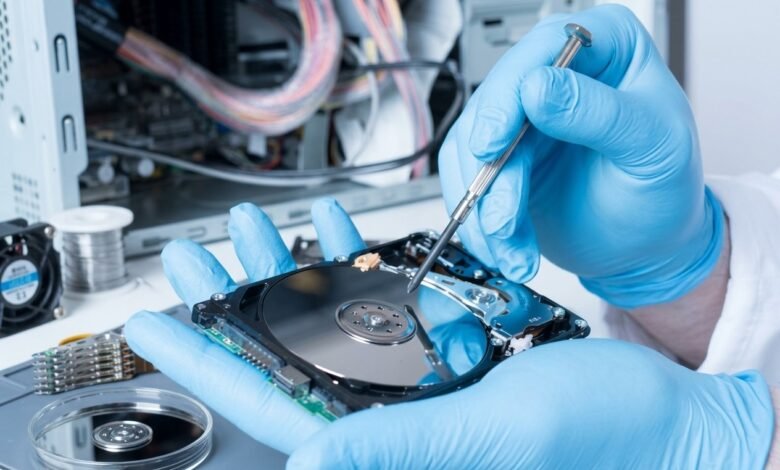
In such instances, professional data recovery laboratories will be the only option. The quality labs have ISO certified cleanrooms, donor drive inventories and specialized equipment like PC-3000 system for firmware and head-stack repairs.
Most known services are diagnostic champions that provide no-cost or low-cost service and then provide a definite quote.
The typical recovery time is 7-14 days and some laboratories offer quick recovery or 24-72 hour emergency services for an extra charge. The average price range is from several hundred to a few thousand dollars, depending on the extent and the speed of the repair work.
Some companies have an impeccable record, such as Ontrack, DriveSavers, Secure Data Recovery, etc., and are specialists in the field. Select a lab that offers a list of recoverable files prior to paying, and one that does not charge for work performed if there is no data recovered, if possible.
Even at the pro level, time sensitivity is still key.
The longer a mechanically problematic drive is not operated, or is simply powered on and off, the less likely it is to succeed eventually.
Expedited services are very much for business continuity or personal urgency, just where time is of the essence.
Effective and successful methods for recovery:
In any recovery, prioritize the most important files. If software identifies thousands of objects, retrieve critical documents and recent work first.
Ensure that clear records are made of all actions performed, including the tools used and when. Don’t fall for unproven “miracle” recovery claims that promise 100 percent success, as realistically expected recovery increases the chances of making a sound decision.
Lastly, after data is securely backed up, have a strong backup plan (preferably 3-2-1: three copies, two different media types, and one offsite) to avoid future crises.
Conclusion
If the hard drive crashes, it doesn’t necessarily mean all the data is lost. Most users can recover critical files, powering down as needed, accurately identifying logical versus physical failures, taking appropriate action (when required) with quality recovery software, and calling in professional cleanroom services for mechanical issues.
The trick is to get fast, but be careful; each unnecessary write or power cycle lowers the chances of success.
No matter if you opt for a program or a laboratory service, the methods listed here provide you with the best and quickest way to recover your data. When disaster strikes it’s easy to turn a crisis into a recovery opportunity if you act quickly and follow safe procedures.